



 (855) 648-7751


VersaDesk Downview Rectangular Conference Table | Sub-Surface Monitors | 4-20 Users | Corporate Boardroom | Law Firm | Made in USA
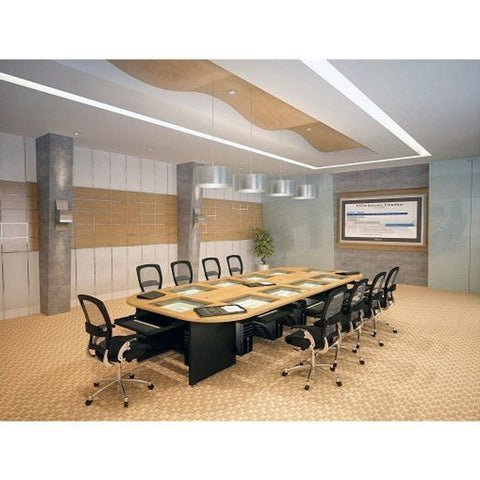
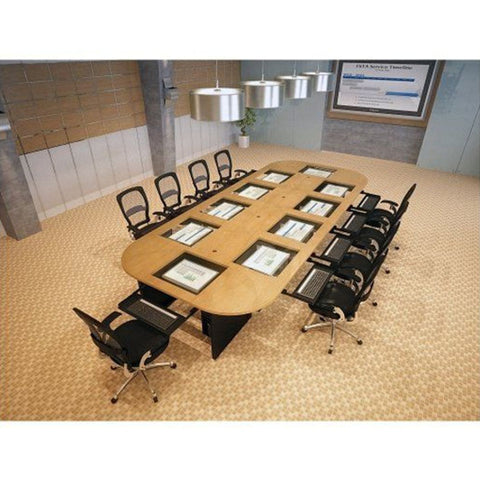
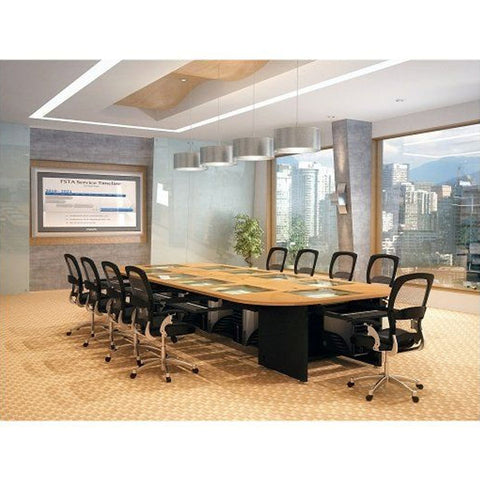
The VersaDesk® Downview Rectangular Conference Table is a revolutionary boardroom conference table that integrates individual computer monitors below the table surface — viewed through anti-glare tempered glass — giving every participant a clean, obstruction-free view of the table while maintaining full access to their own computer workstation. No wall screens, no awkward laptop setups, no cable clutter — just a sleek, professional boardroom table where technology is completely hidden until needed. Available for 4 to 20 users in 8 color combinations, this is the premium conference table choice for corporate boardrooms, law firms, financial institutions, government agencies, and training facilities that demand the highest standard of technology integration.
If you've been searching for a conference table with built-in computer monitors for a corporate boardroom, a downview conference table where monitors are hidden below the surface, a boardroom table for 4-20 users with integrated computers and no wall screens, or the most technologically sophisticated rectangular conference table made in USA — the VersaDesk Downview Rectangular Conference Table is the answer.
The Revolutionary Downview Conference Table Concept
Traditional conference room technology requires wall-mounted screens, awkward laptop setups, tangled cables, and obstructed sightlines. The Downview Rectangular Conference Table eliminates all of these problems with a single elegant solution — individual monitors for every participant, mounted below the table surface and viewed through anti-glare tempered glass. When not needed, fully retractable keyboard drawers slide below the surface — instantly transforming the tech-integrated conference table into a clean, traditional boardroom table.
Key Features
- Downview monitor design — individual monitors for every participant mounted below anti-glare tempered glass surface
- No wall screens required — every participant has their own private monitor directly in front of them
- Modular expandable design — accommodates 4 to 20 users
- Anti-glare tempered glass — crystal clear viewing with zero glare in any lighting condition
- Tilting monitor arms — each monitor adjusts to optimal viewing angle for every user
- Fully retractable keyboard drawers — slide completely below surface when computers not needed
- Two built-in CPU holders — computer towers stored cleanly within the table infrastructure
- Built-in cable management system — all cables hidden, no trip hazards, clean professional appearance
- Laminated scratch-proof surface — durable and easy to clean for heavy conference use
- 8 color combinations — matches any existing boardroom color scheme
- Made in the USA — manufactured in Los Angeles, CA
- Free shipping to all 48 contiguous US states
Specifications
| Monitor Design | Sub-surface downview — individual monitors below anti-glare tempered glass |
| Glass Surface | Anti-glare tempered glass |
| Monitor Arms | Tilting — individually adjustable per user |
| Keyboard | Fully retractable drawers — slide below surface |
| CPU Storage | 2 built-in CPU holders |
| Cable Management | Built-in — fully hidden |
| User Capacity | 4 to 20 users — modular expandable |
| Design | Modular — easy expansion |
| Surface | Laminated scratch-proof |
| Color Options | 8 color combinations |
| Origin | Made in USA — Los Angeles, CA |
| Shipping | Free to 48 contiguous US states |
Available Configurations
The modular design is available in configurations for 4, 6, 8, 10, 12, 14, 16, 18, or 20 users. Select your configuration when ordering — the listed price adjusts to your chosen configuration. For custom layouts or expansion planning, contact us at info@standingdesklife.com or (855) 648-7751.
Who Is the Downview Rectangular Conference Table Best For?
- Corporate boardrooms requiring a premium conference table with integrated computer monitors for every participant
- Law firms and financial institutions needing a downview conference table where confidential documents can be viewed privately by each participant
- Government agencies and military facilities requiring a secure conference table where classified information is not visible on wall screens
- Corporate training rooms needing a conference training table for 4-20 participants with individual computer access and no cable clutter
- Universities and executive education centers looking for a premium technology-integrated conference table for executive programs
- Facilities managers sourcing a boardroom conference table with built-in computers that eliminates wall screens and cable management issues
Downview vs Revolution — Which Conference Table Should You Choose?
| Feature | Downview | Revolution |
| Monitor Design | Fixed below glass surface | Rotating — rises from table |
| Privacy | Maximum — downview only | Visible above surface |
| Best For | Law firms, finance, government | Corporate training, presentations |
Frequently Asked Questions
How does the downview conference table work?
Each participant's monitor is mounted below the table surface and viewed through anti-glare tempered glass. Fully retractable keyboard drawers slide below the surface when not in use — instantly converting the tech table into a clean traditional conference table.
Do we still need wall screens?
No — each participant has their own individual monitor directly in front of them below the glass surface. There is no need for wall screens to share presentations or documents.
Is the monitor visible to other participants?
No — the downview design means each monitor is only visible to the user directly above it, making it ideal for environments where confidential information needs to remain private.
How many users does it accommodate?
The modular design accommodates 4 to 20 users — select your configuration when ordering.
Can it expand in the future?
Yes — the modular design allows for future expansion to accommodate additional users.
What color options are available?
8 color combinations to match any existing boardroom color scheme.
Is it made in the USA?
Yes — manufactured in Los Angeles, CA.
Can I order for a law firm or financial institution?
Yes — contact us at info@standingdesklife.com or call (855) 648-7751 for corporate and institutional orders. We support bulk orders for law firms, financial institutions, and government agencies.
Does it ship free?
Yes — free standard shipping to all 48 contiguous US states.
How much does a shipping cost?
Our Standing desk life provides customers free standard shipping for all order to 48 US Contiguous states only.We do not ship to P.O boxes and We do not ship to Alaska, Hawaii Peurto Rico and Canada. We use Fedex, UPS and USPS First Class.
Do you ship internationally?
No, currently we ship only to 48 contiguous US states only.
When will I receive my order?
Normal Delivery time is 5-15 business days. Please note, we do not ship on Saturdays, Sundays and holidays.
Will I get the tracking number?.
An email with tracking information will be sent once an order has been shipped (with most carriers). If you do not receive tracking information from us within six business days of you order, feel free to follow up with us at info@standingdesklife.com or call us at 1-855-648-7751.
Please inspect your order upon reception and contact us immediately at info@standingdesklife.com or call us at 1-855-648-7751 if the item is defective, damaged or if you receive the wrong item, so that we can evaluate the issue and make it right.
Multiple orders placed on the same day cannot be combined.
We cannot split up an order and ship to multiple locations. If you wish to send items to different locations, you will need to place a seperate order for each shipping address.
We do not have the ability to change the shipping address once an order goes into processing.
What are the payment options?
Credit Cards: We accept credit cards backed by the major providers on our website, including Visa, Mastercard, American Express, and Discover. Unfortunately, we don’t accept some debit cards. If you’re having trouble checking out, please email us at info@standingdesklife.com so we can help.
Apple Pay: If you have an iPhone with Apple Pay enabled, you can use Apple Pay on both desktop and mobile. On desktop, you’ll need MacOS Sierra or above. On iOS, you’ll need iOS 11 or above. Apple Pay is not supported if you visited our site through an in-app browser, like Facebook's.
PayPal: We accept PayPal on both desktop and mobile. If you have a balance in your PayPal account, that balance will automatically be used before your backup payment method (which you’ll select at the time of purchase). NOTE: PayPal may incorrectly suggest that you can pay with your credit card or bank account first, but you won’t be able to. We apologize for any confusion.
GooglePay: If you have a Google account with GooglePay enabled, you can use GooglePay on both desktop and mobile.
Can I pay with PayPal?
Yes, you can pay with PayPal.
At the Billing stage of checkout, select the PayPal option, then click the "PayPal" button. Make sure any pop-up blockers are disabled.
Log in to PayPal and review your account info. We'll deduct from your PayPal balance by default, but you can choose an account to draw from if your balance doesn't cover the full cost. You don't need to enter a billing address.
Click "Agree & Continue" to complete your order.
I’m getting a payment error when I try to check out. What can I do?
If you’re getting an error message when trying to submit your payment, there’s probably an error or a typo in your billing information.
If the error message says “Your payment details couldn’t be verified. Check your card details and try again,” the issue is probably either the credit card number or CVV you entered.
If the error message says “Security code was not matched by the processor,” the issue is probably the CVV you entered.
I was charged more than once for an order. What happened?
If you see multiple charges for the same order on your statement, check your email to see how many order confirmations you received.
If you only received one confirmation, chances are only one of the charged orders went through. The other charge(s) on your statement will disappear in 2-3 business days. If you continue to see these duplicate charges, email us at info@standingdesklife.com
If you didn't receive any confirmation, none of the charged orders went through. Try placing the order again, double-checking that all billing and shipping information is correct.
Refund Policy
We have a 30-day return policy, which means you have 30 days after receiving your item to request a return.
To be eligible for a return, your item must be in the same condition that you received it, unworn or unused, with tags, and in its original packaging. You’ll also need the receipt or proof of purchase.
To be eligible for a return, your item must be in the same condition that you received it, unworn or unused, with tags, and in its original packaging. You’ll also need the receipt or proof of purchase.
To start a return, you can contact us at info@standingdesklife.com. If your return is accepted, we’ll send you a return shipping label, as well as instructions on how and where to send your package. Items sent back to us without first requesting a return will not be accepted.
You can always contact us for any return question at info@standingdesklife.com.
Damages and issues
Please inspect your order upon reception and contact us immediately if the item is defective, damaged or if you receive the wrong item, so that we can evaluate the issue and make it right.
Unfortunately, we cannot accept returns on sale items or gift cards.
Exchanges
The fastest way to ensure you get what you want is to return the item you have, and once the return is accepted, make a separate purchase for the new item.
Refunds
We will notify you once we’ve received and inspected your return, and let you know if the refund was approved or not. If approved, you’ll be automatically refunded on your original payment method. Please remember it can take some time for your bank or credit card company to process and post the refund too.
The VersaDesk® Downview Rectangular Conference Table is a revolutionary boardroom conference table that integrates individual computer monitors below the table surface — viewed through anti-glare tempered glass — giving every participant a clean, obstruction-free view of the table while maintaining full access to their own computer workstation. No wall screens, no awkward laptop setups, no cable clutter — just a sleek, professional boardroom table where technology is completely hidden until needed. Available for 4 to 20 users in 8 color combinations, this is the premium conference table choice for corporate boardrooms, law firms, financial institutions, government agencies, and training facilities that demand the highest standard of technology integration.
If you've been searching for a conference table with built-in computer monitors for a corporate boardroom, a downview conference table where monitors are hidden below the surface, a boardroom table for 4-20 users with integrated computers and no wall screens, or the most technologically sophisticated rectangular conference table made in USA — the VersaDesk Downview Rectangular Conference Table is the answer.
The Revolutionary Downview Conference Table Concept
Traditional conference room technology requires wall-mounted screens, awkward laptop setups, tangled cables, and obstructed sightlines. The Downview Rectangular Conference Table eliminates all of these problems with a single elegant solution — individual monitors for every participant, mounted below the table surface and viewed through anti-glare tempered glass. When not needed, fully retractable keyboard drawers slide below the surface — instantly transforming the tech-integrated conference table into a clean, traditional boardroom table.
Key Features
- Downview monitor design — individual monitors for every participant mounted below anti-glare tempered glass surface
- No wall screens required — every participant has their own private monitor directly in front of them
- Modular expandable design — accommodates 4 to 20 users
- Anti-glare tempered glass — crystal clear viewing with zero glare in any lighting condition
- Tilting monitor arms — each monitor adjusts to optimal viewing angle for every user
- Fully retractable keyboard drawers — slide completely below surface when computers not needed
- Two built-in CPU holders — computer towers stored cleanly within the table infrastructure
- Built-in cable management system — all cables hidden, no trip hazards, clean professional appearance
- Laminated scratch-proof surface — durable and easy to clean for heavy conference use
- 8 color combinations — matches any existing boardroom color scheme
- Made in the USA — manufactured in Los Angeles, CA
- Free shipping to all 48 contiguous US states
Specifications
| Monitor Design | Sub-surface downview — individual monitors below anti-glare tempered glass |
| Glass Surface | Anti-glare tempered glass |
| Monitor Arms | Tilting — individually adjustable per user |
| Keyboard | Fully retractable drawers — slide below surface |
| CPU Storage | 2 built-in CPU holders |
| Cable Management | Built-in — fully hidden |
| User Capacity | 4 to 20 users — modular expandable |
| Design | Modular — easy expansion |
| Surface | Laminated scratch-proof |
| Color Options | 8 color combinations |
| Origin | Made in USA — Los Angeles, CA |
| Shipping | Free to 48 contiguous US states |
Available Configurations
The modular design is available in configurations for 4, 6, 8, 10, 12, 14, 16, 18, or 20 users. Select your configuration when ordering — the listed price adjusts to your chosen configuration. For custom layouts or expansion planning, contact us at info@standingdesklife.com or (855) 648-7751.
Who Is the Downview Rectangular Conference Table Best For?
- Corporate boardrooms requiring a premium conference table with integrated computer monitors for every participant
- Law firms and financial institutions needing a downview conference table where confidential documents can be viewed privately by each participant
- Government agencies and military facilities requiring a secure conference table where classified information is not visible on wall screens
- Corporate training rooms needing a conference training table for 4-20 participants with individual computer access and no cable clutter
- Universities and executive education centers looking for a premium technology-integrated conference table for executive programs
- Facilities managers sourcing a boardroom conference table with built-in computers that eliminates wall screens and cable management issues
Downview vs Revolution — Which Conference Table Should You Choose?
| Feature | Downview | Revolution |
| Monitor Design | Fixed below glass surface | Rotating — rises from table |
| Privacy | Maximum — downview only | Visible above surface |
| Best For | Law firms, finance, government | Corporate training, presentations |
Frequently Asked Questions
How does the downview conference table work?
Each participant's monitor is mounted below the table surface and viewed through anti-glare tempered glass. Fully retractable keyboard drawers slide below the surface when not in use — instantly converting the tech table into a clean traditional conference table.
Do we still need wall screens?
No — each participant has their own individual monitor directly in front of them below the glass surface. There is no need for wall screens to share presentations or documents.
Is the monitor visible to other participants?
No — the downview design means each monitor is only visible to the user directly above it, making it ideal for environments where confidential information needs to remain private.
How many users does it accommodate?
The modular design accommodates 4 to 20 users — select your configuration when ordering.
Can it expand in the future?
Yes — the modular design allows for future expansion to accommodate additional users.
What color options are available?
8 color combinations to match any existing boardroom color scheme.
Is it made in the USA?
Yes — manufactured in Los Angeles, CA.
Can I order for a law firm or financial institution?
Yes — contact us at info@standingdesklife.com or call (855) 648-7751 for corporate and institutional orders. We support bulk orders for law firms, financial institutions, and government agencies.
Does it ship free?
Yes — free standard shipping to all 48 contiguous US states.
How much does a shipping cost?
Our Standing desk life provides customers free standard shipping for all order to 48 US Contiguous states only.We do not ship to P.O boxes and We do not ship to Alaska, Hawaii Peurto Rico and Canada. We use Fedex, UPS and USPS First Class.
Do you ship internationally?
No, currently we ship only to 48 contiguous US states only.
When will I receive my order?
Normal Delivery time is 5-15 business days. Please note, we do not ship on Saturdays, Sundays and holidays.
Will I get the tracking number?.
An email with tracking information will be sent once an order has been shipped (with most carriers). If you do not receive tracking information from us within six business days of you order, feel free to follow up with us at info@standingdesklife.com or call us at 1-855-648-7751.
Please inspect your order upon reception and contact us immediately at info@standingdesklife.com or call us at 1-855-648-7751 if the item is defective, damaged or if you receive the wrong item, so that we can evaluate the issue and make it right.
Multiple orders placed on the same day cannot be combined.
We cannot split up an order and ship to multiple locations. If you wish to send items to different locations, you will need to place a seperate order for each shipping address.
We do not have the ability to change the shipping address once an order goes into processing.
What are the payment options?
Credit Cards: We accept credit cards backed by the major providers on our website, including Visa, Mastercard, American Express, and Discover. Unfortunately, we don’t accept some debit cards. If you’re having trouble checking out, please email us at info@standingdesklife.com so we can help.
Apple Pay: If you have an iPhone with Apple Pay enabled, you can use Apple Pay on both desktop and mobile. On desktop, you’ll need MacOS Sierra or above. On iOS, you’ll need iOS 11 or above. Apple Pay is not supported if you visited our site through an in-app browser, like Facebook's.
PayPal: We accept PayPal on both desktop and mobile. If you have a balance in your PayPal account, that balance will automatically be used before your backup payment method (which you’ll select at the time of purchase). NOTE: PayPal may incorrectly suggest that you can pay with your credit card or bank account first, but you won’t be able to. We apologize for any confusion.
GooglePay: If you have a Google account with GooglePay enabled, you can use GooglePay on both desktop and mobile.
Can I pay with PayPal?
Yes, you can pay with PayPal.
At the Billing stage of checkout, select the PayPal option, then click the "PayPal" button. Make sure any pop-up blockers are disabled.
Log in to PayPal and review your account info. We'll deduct from your PayPal balance by default, but you can choose an account to draw from if your balance doesn't cover the full cost. You don't need to enter a billing address.
Click "Agree & Continue" to complete your order.
I’m getting a payment error when I try to check out. What can I do?
If you’re getting an error message when trying to submit your payment, there’s probably an error or a typo in your billing information.
If the error message says “Your payment details couldn’t be verified. Check your card details and try again,” the issue is probably either the credit card number or CVV you entered.
If the error message says “Security code was not matched by the processor,” the issue is probably the CVV you entered.
I was charged more than once for an order. What happened?
If you see multiple charges for the same order on your statement, check your email to see how many order confirmations you received.
If you only received one confirmation, chances are only one of the charged orders went through. The other charge(s) on your statement will disappear in 2-3 business days. If you continue to see these duplicate charges, email us at info@standingdesklife.com
If you didn't receive any confirmation, none of the charged orders went through. Try placing the order again, double-checking that all billing and shipping information is correct.
Refund Policy
We have a 30-day return policy, which means you have 30 days after receiving your item to request a return.
To be eligible for a return, your item must be in the same condition that you received it, unworn or unused, with tags, and in its original packaging. You’ll also need the receipt or proof of purchase.
To be eligible for a return, your item must be in the same condition that you received it, unworn or unused, with tags, and in its original packaging. You’ll also need the receipt or proof of purchase.
To start a return, you can contact us at info@standingdesklife.com. If your return is accepted, we’ll send you a return shipping label, as well as instructions on how and where to send your package. Items sent back to us without first requesting a return will not be accepted.
You can always contact us for any return question at info@standingdesklife.com.
Damages and issues
Please inspect your order upon reception and contact us immediately if the item is defective, damaged or if you receive the wrong item, so that we can evaluate the issue and make it right.
Unfortunately, we cannot accept returns on sale items or gift cards.
Exchanges
The fastest way to ensure you get what you want is to return the item you have, and once the return is accepted, make a separate purchase for the new item.
Refunds
We will notify you once we’ve received and inspected your return, and let you know if the refund was approved or not. If approved, you’ll be automatically refunded on your original payment method. Please remember it can take some time for your bank or credit card company to process and post the refund too.


